
Step-by-step Kirabet deposit guide for the Maldives: Bank of Maldives and Maldives Islamic Bank transfers in MVR, the USD BML account, Neteller, Skrill and 28 cryptocurrencies, exactly as the wallet on shows them.
Minimum deposit 50 MVR, maximum 160,000 MVR per transfer. No deposit fee is shown in the wallet; deposits below the minimum are refunded.
Published by Kirabet. This guide walks through every deposit method in the Kirabet wallet on kira222.com, with the minimums, the deposit bonuses offered at the cashier and the rules that decide whether a transfer is credited. It is written for players in the Maldives; amounts are in Maldivian rufiyaa (MVR) unless stated, and the wallet quotes 1 $ = 16 MVR for bank transfers.
You need to be logged in before the Deposit tab appears. New to Kirabet? Create an account first — it takes about two minutes and no deposit is required to register. For the overview of all methods and withdrawal limits, see the Kirabet payments hub.
The Deposit tab of the Kirabet wallet shows seven tiles. Six of them are bank or e-wallet accounts handled as a manual transfer; the seventh opens the crypto list. Each tile shows its own minimum on the next screen.
| Deposit method | Minimum | Maximum | Currency | Deposit bonus offered |
|---|---|---|---|---|
| Bank of Maldives (BML) | 50 MVR | 160,000 MVR | MVR | 15% or 100% first deposit (MVR) |
| Maldives Islamic Bank (MIB) | 50 MVR | 160,000 MVR | MVR | 15% or 100% first deposit (MVR) |
| USD BML Account | 50 MVR equivalent | 160,000 MVR equivalent | USD | 15% or 100% first deposit (USD) |
| Neteller | 50 MVR equivalent | 160,000 MVR equivalent | MVR / USD | Same bank-transfer bonuses |
| Skrill | 50 MVR equivalent | 160,000 MVR equivalent | MVR / USD | Same bank-transfer bonuses |
| Others | 50 MVR equivalent | 160,000 MVR equivalent | MVR / USD | Same bank-transfer bonuses |
| Crypto Currency (28 coins) | Shown per coin in the wallet | Shown per coin in the wallet | USDT, BTC, ETH and more | No bonus shown on the crypto screen |
Quick-amount buttons in the MVR wallet are 50, 250, 1,000, 5,000 and 20,000 MVR. The wallet shows no deposit fee; your own bank or e-wallet may charge for the transfer, and the terms note that any such charge is yours.
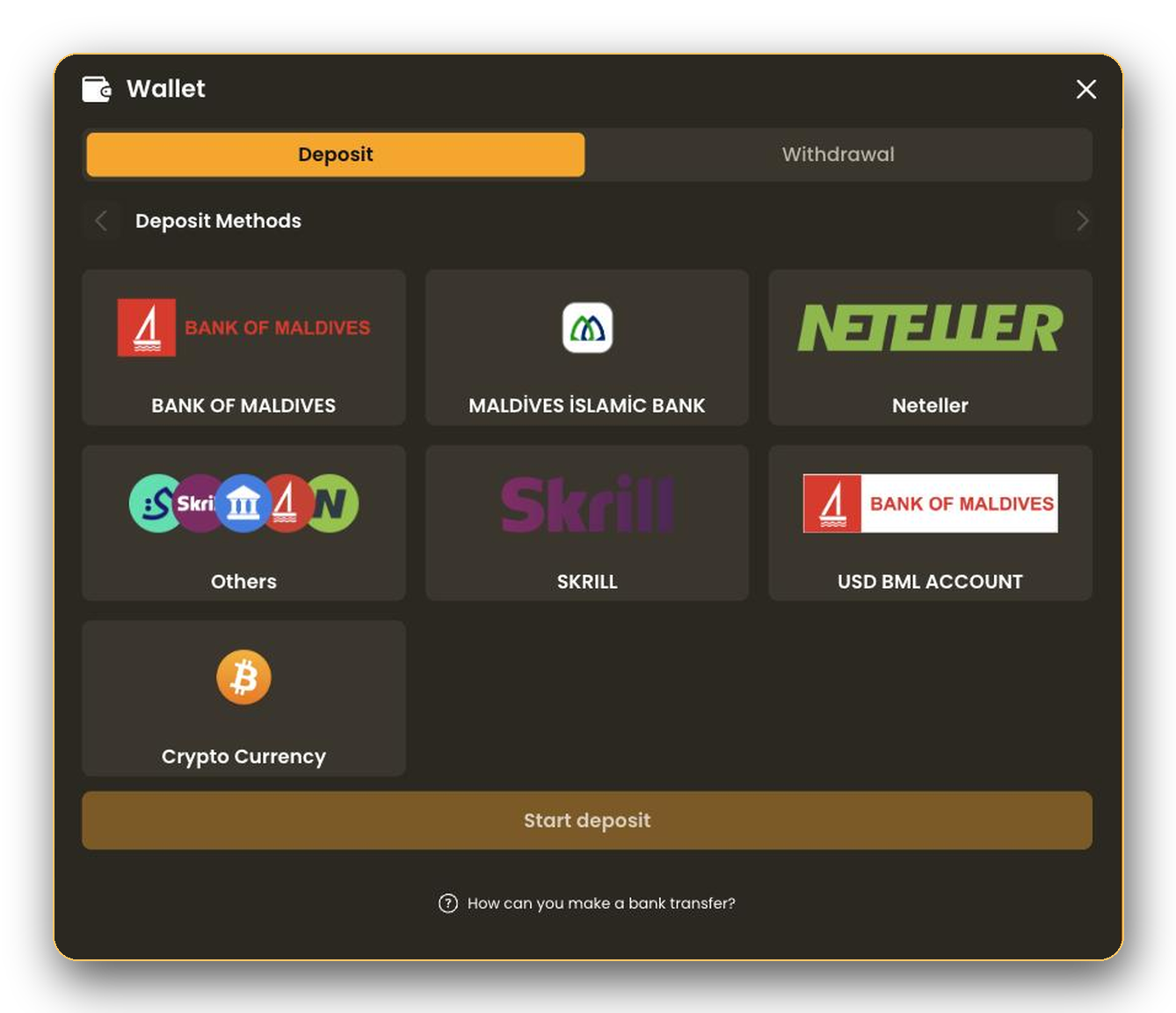
These four tiles follow the same bank-transfer flow as BML and MIB. USD BML Account is for players who hold a US-dollar account at Bank of Maldives: the deposit is made in USD and the wallet shows the USD bonus versions (100% first deposit from 5 USD, 15% from 3 USD, each capped at 1,000 USD). Neteller, Skrill and Others are e-wallet or alternative accounts: select the tile, press Start deposit, choose a bonus or decline it, press Start Process and send the transfer to the account details the wallet shows.
Whichever tile you use, the account you send from becomes your payout account: the wallet states that withdrawals go only to an account number you have deposited from. Use the account you will want to be paid to.
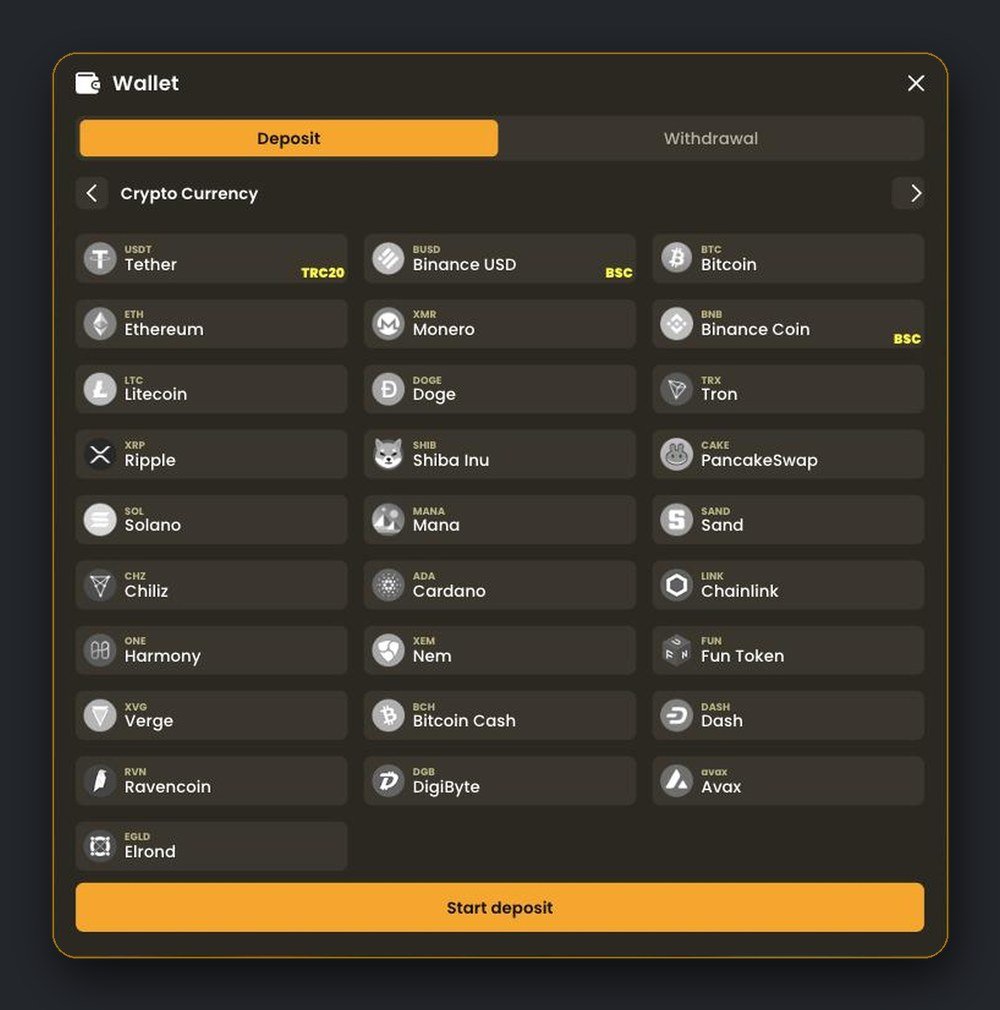
Supported coins: USDT, BUSD, BTC, ETH, XMR, BNB, LTC, DOGE, TRX, XRP, SHIB, CAKE, SOL, MANA, SAND, CHZ, ADA, LINK, ONE, XEM, FUN, XVG, BCH, DASH, RVN, DGB, AVAX and EGLD. Crypto is a deposit method only — the Withdrawal tab lists bank transfer — so ask live support how a payout will be handled before you deposit crypto only.
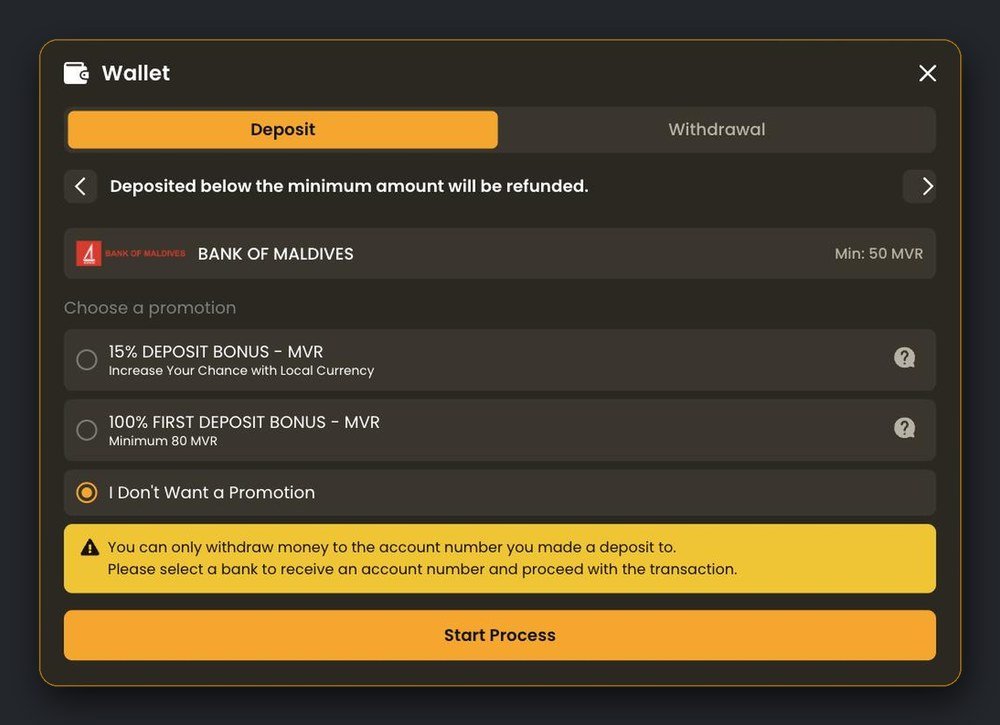
The promotion list appears after you pick a bank tile. Nothing is applied unless you select it; the default is I Don’t Want a Promotion.
| Bonus | Currency | Minimum deposit | Maximum bonus | How often |
|---|---|---|---|---|
| 100% First Deposit Bonus – MVR | MVR | 80 MVR (shown as “Minimum 80 MVR”) | 16,000 MVR | First deposit only |
| 15% Deposit Bonus – MVR | MVR | 50 MVR | 16,000 MVR | Can be taken repeatedly |
| 100% First Deposit Bonus | USD | 5 USD | 1,000 USD | First deposit only |
| 15% Deposit Bonus | USD | 3 USD | 1,000 USD | Can be taken repeatedly |
Each bonus has its own wagering requirement, and the Kirabet Help Centre states that bonus terms must be completed before a withdrawal. If you plan to withdraw soon after depositing, a bonus-free deposit keeps things simpler. Full conditions are on the Kirabet bonuses page and behind the question-mark icon next to each promotion in the wallet.
Related guides: how to withdraw from Kirabet and all Kirabet payment methods.
Bank transfers are matched manually, so a short wait is normal. Confirm the amount and the account match what the wallet showed, then open live support with the transfer date, amount and reference, or attach the receipt in the wallet.
The wallet states that deposits below the minimum are refunded rather than credited. Contact live support with the receipt so the refund can be matched to your transfer.
The terms require deposits from an account in your own name. Contact live support straight away; the transfer may be returned, and it will not count as a payout account for withdrawals.
Check the transaction on the coin’s block explorer. If it has confirmed on the network shown in the wallet but the balance is unchanged, send the transaction hash to live support. A transfer on the wrong network cannot be recovered by Kirabet.
50 MVR by bank transfer (Bank of Maldives, Maldives Islamic Bank and the other bank-list tiles). The maximum is 160,000 MVR per transfer.
Log in, open the wallet, select Bank of Maldives, press Start deposit, choose or decline a promotion, press Start Process and transfer the amount to the account the wallet shows.
The wallet shows no deposit fee. Your own bank or e-wallet may charge a transfer fee, which Kirabet does not refund.
Yes, with the USD BML Account tile. The bank transfer rate shown in the wallet is 1 $ = 16 MVR, and USD deposits get the USD bonus versions.
28 coins including USDT (TRC20), BUSD and BNB (BSC), BTC, ETH, LTC, DOGE, TRX, XRP, SOL and ADA. The wallet shows an address for the coin you pick.
Bank transfers are credited once Kirabet matches your transfer; crypto is credited after network confirmation. The wallet does not publish a fixed time, so keep your receipt and contact live support if the balance has not updated.
No. Leave “I Don’t Want a Promotion” selected and the deposit is credited without bonus conditions.
Open the wallet on kira222.com, pick your bank and follow the steps above. Your first transfer also sets the account you will be paid to.