
Official Kirabet withdrawal guide for the Maldives: the bank-transfer payout form on kira222.com, the 160 MVR minimum, the 49,000 MVR daily cap, the two-withdrawals-a-day rule and what the terms say about fees and verification.
Payouts go to Bank of Maldives, Maldives Islamic Bank, a USD BML account, Neteller or Skrill — always the account you deposited from.
Published by Kirabet. This page explains how a withdrawal works in the Kirabet wallet on kira222.com: the form you fill in, the limits the wallet enforces, how long payouts usually take according to the Kirabet Help Centre, and the conditions in the terms that can hold a request back. Amounts are in Maldivian rufiyaa (MVR); the wallet quotes 1 $ = 16 MVR for bank transfers.
Withdrawals use one method, Bank Transfer, with the same bank and e-wallet list as deposits. If you have not deposited yet, start with the Kirabet deposit guide — the account you deposit from is the account you will be paid to. The payments hub compares every method side by side.
| Rule | Value shown in the wallet or terms |
|---|---|
| Withdrawal method | Bank Transfer (BML, MIB, USD BML Account, Neteller, Skrill, Others) |
| Minimum withdrawal | 160 MVR per request |
| Maximum withdrawal | 49,000 MVR per request and per day |
| Requests per day | 2 (the wallet counts how many you have used) |
| Processing time | Usually 1–2 hours; up to 24 hours in special cases (Kirabet Help Centre) |
| Payout account | Only an account you have deposited from |
| Currency | MVR (USD for the USD BML Account); rate shown 1 $ = 16 MVR |
| Monthly cap (terms) | 10,000 EUR equivalent; 5,000 EUR when your balance is at least 10× your total deposits |
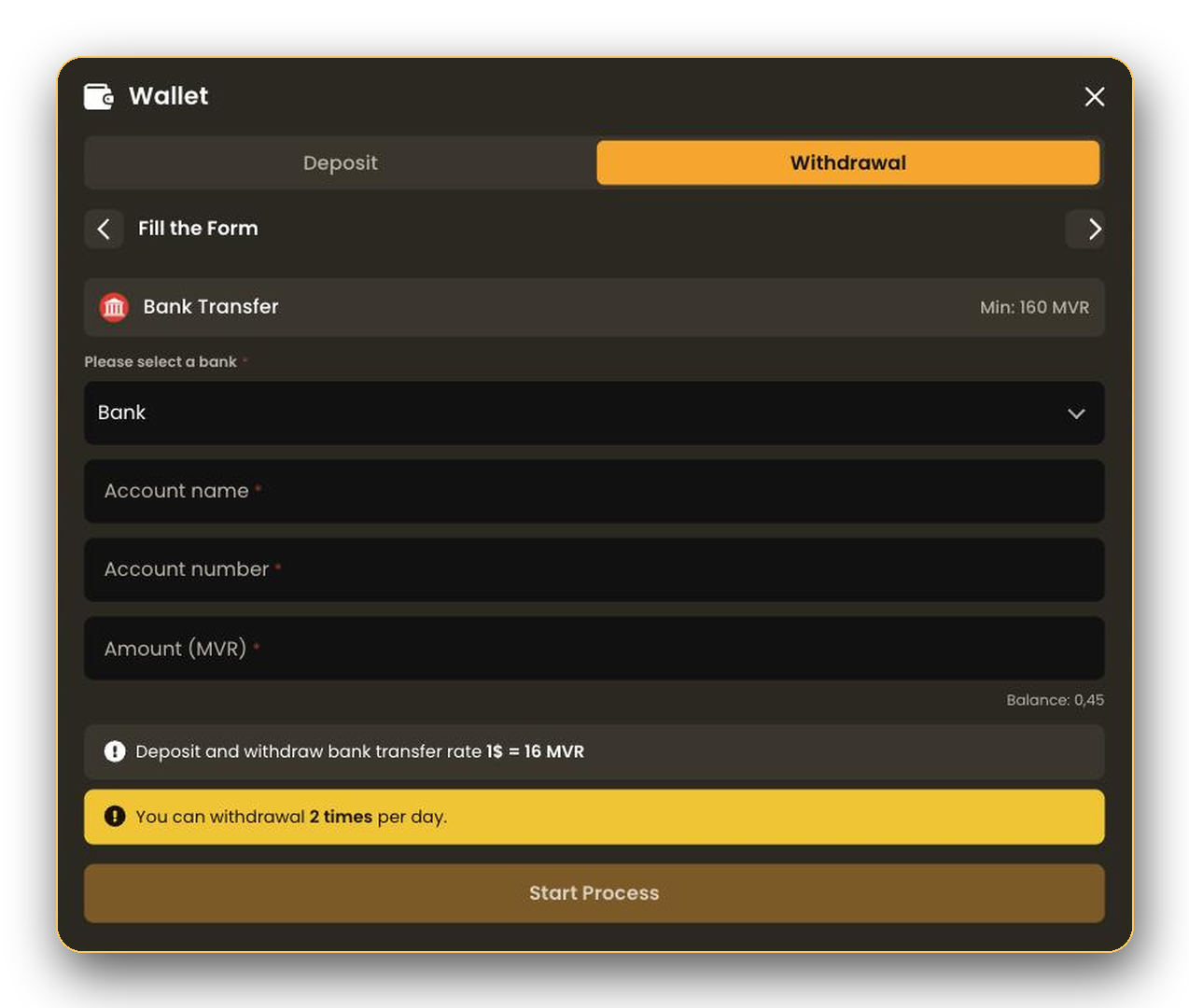
The withdrawal form shows your current balance under the amount field and refuses amounts below 160 MVR, above 49,000 MVR or above your balance. Kirabet can change these values; the wallet always shows the live ones.
Two rules decide this. The wallet states on the deposit screen that you can only withdraw money to the account number you made a deposit to, and clause 8.4 of the Kirabet terms says withdrawals must go back to the original payment method; a different method is allowed only at Kirabet’s discretion and after extra security checks. In practice:
| Condition | What applies |
|---|---|
| Deposit without a bonus | Must be wagered before you withdraw (Kirabet Help Centre). Clause 8.2 of the terms: roll the deposit over at least once and no withdrawal commission applies. |
| Deposit with a bonus | Complete the bonus wagering terms first; a withdrawal is not processed while bonus conditions are open. |
| Deposit not wagered | The terms allow Kirabet to deduct 8% (minimum 4 EUR equivalent) as an anti-money-laundering fee. |
| Identity verification | Kirabet may request photo ID, proof of address, a selfie or a verification call before paying out (clause 8.3). |
| Account closure | You may withdraw the full balance even if it is below the usual minimum (clause 8.1). |
| Mistaken credits | Amounts credited in error remain Kirabet’s property and are reversed (clause 6.6). |
Verification can make a first payout take longer than the Help Centre’s 1–2 hours. Having your documents ready before you request a withdrawal avoids the wait.
The form blocks requests that break a limit: under 160 MVR, over 49,000 MVR, more than your balance, or a missing bank, account name or number. The wallet shows the reason as a notice; fix the field and try again.
The daily limit is two requests and 49,000 MVR in total. The counter resets the next day; split a larger payout across days.
Usual causes: the account number is not one you deposited from, a bonus is still open, or verification is pending. Live support can tell you which one applies and what to send.
Check the status in the Withdrawal tab first. If it is still pending after 24 hours, contact live support with the date and amount of the request. Bank processing on the receiving side can add time after the status shows Transferred.
160 MVR per request. The maximum is 49,000 MVR per request and per day.
According to the Kirabet Help Centre, withdrawals are usually completed within 1–2 hours and can take up to 24 hours in special cases. Verification requests can extend this.
Two. The withdrawal form shows “You can withdrawal 2 times per day” and tracks how many you have used.
Only to an account number you have deposited from. The terms allow an exception at Kirabet’s discretion after extra security checks.
No fee once the deposit has been wagered at least once. If it has not, the terms allow an 8% fee with a 4 EUR minimum.
Not in the current wallet; the Withdrawal tab lists Bank Transfer only. Crypto is a deposit method.
Kirabet may ask for photo ID, proof of address or a selfie before paying out. Complete verification early to avoid delays.
Open the wallet, switch to the Withdrawal tab and fill in the account you deposited from. Keep your bonus terms completed and your documents ready for a smooth payout.